


Baby Tracker by Sprout
4.246.00 Reviews
App Specs
- Version
- 1.7
- Updated On
- License
- Free
- Downloads
- 10,000+
- Developer
- Sprout Apps
- Categories
- Parenting
- Platform
- Android
Screenshots
 Analysis by AppCompare
On a busy day with a new baby, it’s easy for small details to blur together: when the last feed happened, how long a nap lasted, or whether a diaper change was before or after the latest bottle. Baby Tracker by Sprout is built to keep those details in one place. I see its main value less as a substitute for parental instincts and more as a steady record you can check when tiredness makes your memory unreliable.
What to expect from a baby-tracking app
This is a parenting app from Sprout Apps, aimed at caregivers who want to record everyday care and look back for patterns. Its focus is practical: feeding, sleep, diapers, and health-related insights, rather than entertainment or a broad collection of parenting articles. The app is free to install, with optional in-app purchases ranging from $5.99 to $99.99 per item, so it makes sense to try the basic experience before deciding whether you need anything beyond it.
It has a Teen content rating, a 4.2 average from around 190 ratings, and more than 10,000 installs. The app was released on October 11, 2023, and version 1.7 requires iOS 12 or later. Those details give a useful sense of the product’s place in the parenting-app landscape, but the more important question for a new user is whether its logging routine fits into the rhythm of caring for a baby.
Getting Started with Baby Tracker by Sprout
Right off the bat, setting up Baby Tracker by Sprout is a breeze. After downloading, you’re greeted with a clean and intuitive interface that doesn’t require a degree in rocket science to navigate. You can easily create a profile for your baby, including all the essential details like birth date and weight. It’s like setting up a Facebook profile, but way cuter!
Make the first setup manageable
My advice is to begin with only the details you’re ready to enter. A tired parent does not need to turn setup into a project, and a tracking tool is useful even when you start with a simple record of feeds, sleep, and diaper changes. If you are unsure about a detail, leave it for later rather than guessing. The point is to make the next entry easy, not to create a perfect history on the first day.
Before logging regularly, agree with anyone sharing care on what you want to track. One caregiver may care most about feeding times; another may want a clearer picture of sleep. A short shared routine—record the event soon after it happens, and use the same approach each time—keeps the timeline more helpful than trying to reconstruct a full day from memory at night.
Get one useful result first
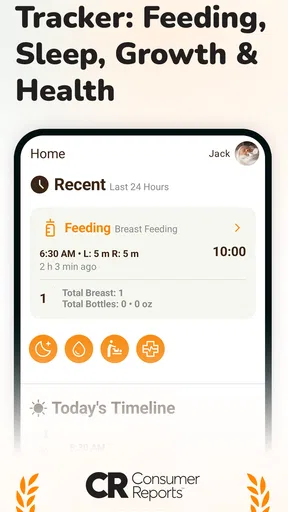
Your first meaningful success can be very small: log a feed, then check the record before the next one. That single loop shows whether the controls feel quick enough for your actual routine. If it helps you answer “When did we last feed?” without asking someone else or searching through messages, the app has already earned a place in your day.
Worth Reading Before You Choose

Flipboard Shows What News Apps Must Do Beyond the Feed

Switching to Android Auto Means Rethinking Your Driving Routine

Google Calendar Makes a Crowded Week Easier to Manage

Ludo King Makes the Most of the Minutes Between Plans

Baby Panda World Brings Quick Play to Modern Phones, but Its Game Library Feels Busy

ESPN’s Live Game View Makes Following Close Games Easier
From there, add another kind of entry only if it solves a real problem. For instance, if naps are hard to keep straight, start recording sleep as well. This gradual approach is more sustainable than trying to capture every detail from the beginning. It also makes it easier to notice which parts of the app you genuinely use and which would only add extra tapping.
All-in-One Tracking
The app covers all the bases. Whether it’s feeding, diaper changes, sleep, or even growth milestones, you can log it all with a few taps. There’s a real sense of satisfaction in tracking these everyday occurrences. It’s like winning at Tetris, but instead of blocks, you’re stacking up moments of your baby's day.
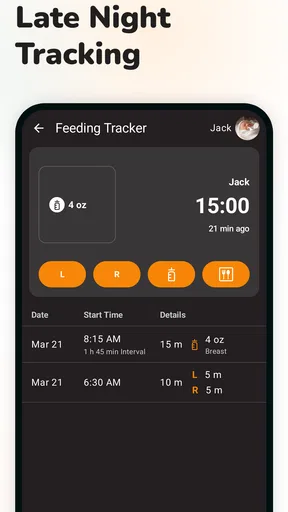
The feeding tracker is super handy, especially for new parents who are still finding their rhythm. You can track breastfeeding, bottle feeding, and even solid foods when the time comes. And hey, no more hazy middle-of-the-night feedings where you can’t remember which side you last fed from. Hallelujah!
Use the record as a handoff, not a scorecard
A practical, less obvious use is to check the timeline when one caregiver takes over from another. Instead of relying on a rushed “I think the baby ate recently” conversation, the next person can review what was logged and decide what to do from there. This works best when entries are made close to the event; delayed logging can make a tidy record look more certain than anyone’s memory really is.
That distinction matters. A tracker can help you communicate what happened, but it cannot decide whether a baby is hungry, comfortable, or unwell. I would use its record to support a conversation with another caregiver or a clinician, not as a reason to ignore what you are seeing in the moment.
Sleep Like a Baby
Now, let’s talk sleep. We all know that sleep becomes the holy grail once you have a baby. The sleep tracker is fantastic for understanding your baby’s sleep patterns, and it even gives you a gentle nudge when it’s time for the next nap. This feature is a lifesaver for those of us who might lose track of time binge-watching Netflix during naptime.
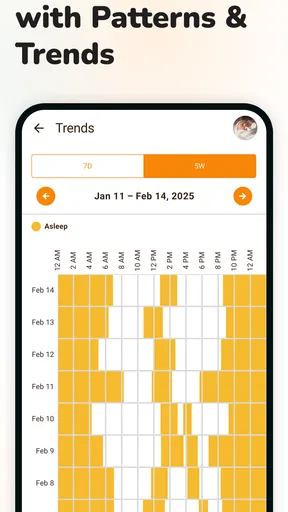
Sleep records are most useful when you treat them as a way to compare days, not a promise that tomorrow will follow the same pattern. If a nap runs late or a night is unusual, note what actually happened rather than trying to make the day fit a tidy routine. Real life with a baby is variable, and the app’s value is in helping you see a history, not enforcing a schedule.
Growth and Milestones
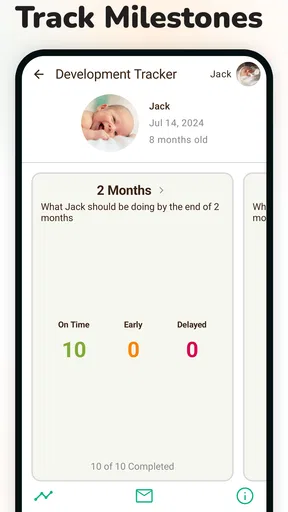
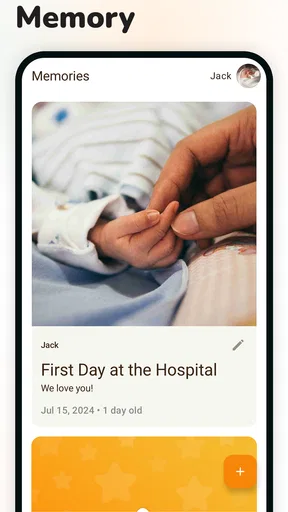
One of my favorite parts of the app is the growth and milestones tracker. You can log everything from your baby’s first smile to their first steps. It’s like a digital baby book that you can carry in your pocket. Plus, you’ll have all the info ready for those pediatrician visits. No more scrambling to remember when they first rolled over!
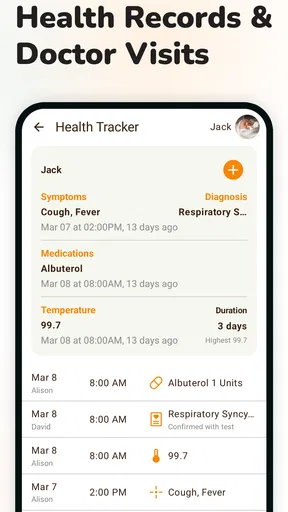
For appointments, I would use this as a memory aid: review the entries you want to discuss before you go, then explain what you have noticed in your own words. A record can make it easier to recall when something changed, but it is not a diagnosis or a substitute for professional advice. That is a useful boundary for any health-related tracking, especially when charts and summaries make ordinary fluctuations look more definitive than they are.
Smart Insights
Sprout’s Baby Tracker doesn’t just log data; it analyzes it to provide you with insightful reports. You can view charts and summaries that help you spot trends and patterns. It’s like having a mini analytics team focused on making sure your baby is as content as possible. These insights can be especially reassuring when you’re second-guessing your parenting decisions.
To get more from those summaries, look for changes that persist across several entries rather than reacting to one unusual day. A trend can give you a better question to raise with a health professional, or help you notice that a routine has shifted. It cannot tell you why a pattern changed, though, so I would avoid treating a visual report as an explanation on its own.
Common points of confusion
The first is whether every event needs to be recorded. In my view, no. If recording a detail interrupts feeding, settling, or simply being present with your baby, skip it and return to the app when you can. A partial log that you can maintain is more useful than an exhaustive one that makes caregiving feel like paperwork.
The second is how to handle gaps. Don’t fill in uncertain times just to make the history look complete. If you remember that an event happened but not exactly when, keep your note honest and move on. This protects the usefulness of later patterns, because a record made of guesses can create false confidence.
Another question is whether the insights replace a paper notebook or a clinician’s guidance. For everyday memory and pattern review, an app can be more convenient than loose notes. For advice about health, feeding concerns, or a baby’s needs, it should remain a supporting tool. If your preferred method is a simple notebook and you rarely need charts or reminders, that may be less distracting and entirely adequate.
User Experience
In terms of user experience, the app is smooth and responsive. The design is minimalistic yet vibrant, which makes it pretty enjoyable to use. Even if you’re not tech-savvy, you’ll find it easy to navigate. And guess what? No annoying ads popping up every five seconds. Can I get an amen?
There are also handy reminders that can be set up for just about anything. Need a nudge for the next feeding or diaper change? The app’s got your back. It’s like having a savvy friend whispering in your ear, "Hey, time to feed the baby!"
Reminders are best treated as prompts to check in, rather than instructions to follow automatically. Babies do not always follow a predictable timetable, and a notification cannot judge the situation in front of you. I would keep only the reminders that solve a genuine memory problem; too many alerts can become background noise when your day is already full.
Sharing and Syncing
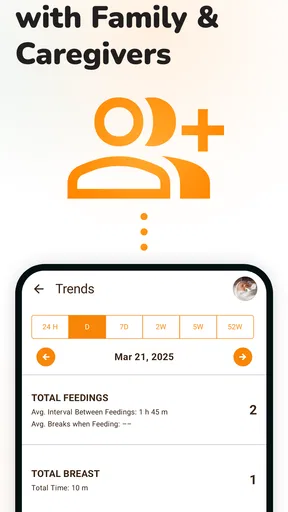
Another cool feature is the ability to share your baby's data with other caregivers. If you’ve got grandparents or a nanny involved, they can stay in the loop with real-time updates. Plus, the data is synced across multiple devices, so you and your partner can both be on the same page.
For a handoff, a quick look at the latest entries can help a partner or caregiver take over without a long recap. The trade-off is that shared tracking only works well when everyone follows the same simple habits. If one person logs every event and another rarely opens the app, the timeline will be incomplete, so agree on who is recording what rather than assuming the record captures everything.
Who will get the most from it
I think this app is a particularly good fit for first-time parents who are still building confidence around the daily sequence of feeds, changes, and naps. It can also help when several people share care, or when a parent wants to bring a clearer account of recent routines to an appointment. The strongest case is not that the app makes parenting effortless; it is that a shared, searchable record can remove a few avoidable memory lapses.
It may be the wrong choice if you dislike entering information on a phone, prefer to keep family records offline, or find notifications stressful. It is also not ideal if you expect a tracker to prescribe a routine or explain a health concern. In those situations, a paper log, a basic notes app, or direct guidance from a pediatric professional may serve you better than a dedicated tracker.
A realistic day with the app
Imagine one caregiver handles an early feed and another takes over later after a broken night. The first person records the feed while it is still fresh. At handoff, the next caregiver checks the recent entries, logs a diaper change, and starts a sleep entry when the baby settles. By evening, the family can look back at the day without relying on a chain of half-remembered messages.
The useful part is the handoff, not producing a flawless chart. If the household gets busy and misses an entry, carry on with the next one. That small adjustment keeps the tool from becoming another source of guilt and leaves the record practical enough to use tomorrow.
How it compares with simpler alternatives
Compared with a paper notebook, a dedicated app makes it easier to keep several types of baby-care notes together and review patterns without flipping through pages. A notebook, however, can be quicker for someone who wants to write a short line and put the phone away. A general notes app is flexible, but it usually requires more effort to keep entries consistent and find a useful sequence later.
Against other baby trackers, the decision comes down to fit rather than the number of features. Baby Tracker’s appeal is its combination of everyday logs, reminders, and summaries in one place. If you only need to remember the last feed, a simpler tool could be enough. If you want detailed medical monitoring or a highly structured care plan, use a tool or professional service designed for that purpose instead of expecting a general parenting tracker to fill that role.
One small routine that improves the record
Choose a consistent moment for logging: immediately after an event when practical, or during the next calm pause if your hands are full. Then make a quick check before a caregiver handoff or at the end of the day. This two-part habit is more valuable than trying to study charts constantly; it gives you a usable timeline while keeping the app in the background of family life.
If you are considering optional purchases, first spend time with the free version and identify a specific need you cannot meet. That keeps the decision grounded in your own routine rather than the assumption that paid options are automatically necessary. Because the app is free to start, you can judge whether the logging style suits you before spending anything.
My recommendation for a first-time parent
Finally, the app is available on both Android and iOS, so no matter what device you’re rocking, you’re good to go. And yes, it’s free with optional in-app purchases, so it won’t break the bank.
So, if you’re looking for an app that will help you stay organized, sane, and on top of your parenting game, Baby Tracker by Sprout is definitely worth checking out. With its comprehensive tracking features and user-friendly design, it’s like having an extra pair of hands when you need them most. Now, if only it could change diapers too!
Pros
- Intuitive interface for easy navigation.
- Customizable reminders for feedings and naps.
- Comprehensive growth tracking features.
- Syncs data across multiple devices seamlessly.
- Offers detailed daily and weekly reports.
Cons
- Limited free features without subscription.
- Occasional syncing issues reported by users.
- Lacks integration with some smart devices.
- Notifications can be overly frequent.
- No offline mode for data entry.
FAQs for Baby Tracker by Sprout
What features does Baby Tracker by Sprout offer?
Baby Tracker by Sprout offers a comprehensive suite of features to help new parents manage their baby's daily activities. This includes tracking feeding times, diaper changes, sleep patterns, and growth milestones. The app also provides insights and personalized tips based on your baby’s development, making it a valuable tool for first-time parents.
Is Baby Tracker by Sprout user-friendly for new parents?
Absolutely. Baby Tracker by Sprout is designed with a simple and intuitive interface that makes it easy for new parents to log and track their baby's activities. The app is straightforward, with clear navigation and helpful prompts to ensure parents can quickly access and input information without hassle.
Does Baby Tracker by Sprout offer any integration with wearable devices?
Yes, Baby Tracker by Sprout supports integration with various wearable devices, allowing parents to seamlessly sync health and activity data. This feature enhances the app’s functionality, providing a more detailed overview of the baby’s well-being and making it easier to track growth and development in real-time.
Is the data in Baby Tracker by Sprout secure and private?
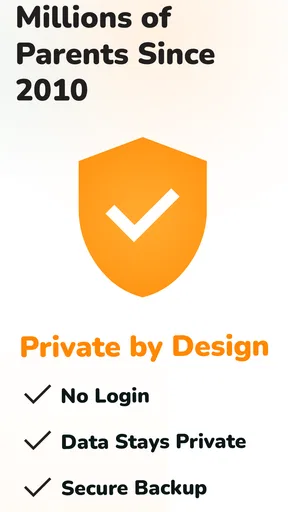
Yes, the app places a strong emphasis on data security and privacy. Baby Tracker by Sprout uses encryption to protect all user data and adheres to industry-standard privacy practices. Users can rest assured that their information is safe and only accessible to them, ensuring peace of mind.
Can multiple users access and update the baby’s information on Baby Tracker by Sprout?
Definitely. Baby Tracker by Sprout allows multiple caregivers to access and update the baby's information. This feature is particularly useful for families where both parents or additional caregivers need to stay informed about the baby's daily activities and milestones, promoting better coordination and care.


